


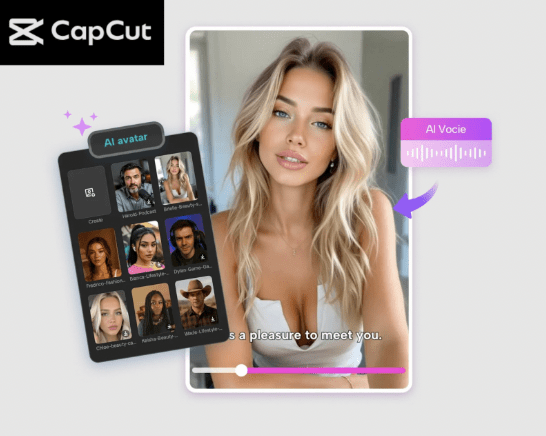
It may be difficult to make a video with a digital presenter using a script. You are ready to share your ideas, and not all the time, it is an easy task to make them visible on the screen coherently and interestingly.
This is one of the areas AI avatars can assist. An AI avatar is something that can have a script read out by a virtual character and keep users engaged and attentive.
This is simple with the help of CapCut Desktop Video Editor. You are able to choose an avatar and even assign a voice to it, and have it read your script right into it. You can automatically convert your written words to a voiceover using applications such as text to speech AI.
This is time-saving and makes videos more involved. The next time you do a video, consider trying AI avatar,s and you will find it a lot easier to make your scripts come alive.
Artificial Intelligence Avatar of On-screen Digital Presenters
An AI avatar is a digital figure that is able to talk, move, and present your material on the screen. You do not have to record yourself or get a person, but you can utilize an avatar to read out your script. It can be of particular use to teachers, video developers, or advertisers who need to create videos in a hurry.
AI avatars make the viewers engaged as the personality addresses them with direct language. The video is professional, yet it does not require cameras, lights, or a live human being. It is also very time-saving.
The feature of the AI avatar is provided by CapCut PC. You can go through thousands of characters, pick the one that you like, and provide it with a voice. The avatar can spell and read your script.
The background, voice, and style can also be altered to suit your content. Some features cost a payment, yet the fundamental tools of creating an avatar are free. This allows you to make videos that appear professional and keep the audience interested.
Advantages of AI Avatar in Scripted Videos
There are numerous benefits of an AI avatar.
- First, it saves time. You do not need to record or even synchronize speech manually. The avatar does it all for you.
- Second, the output is professional-looking. The quality of avatars is consistent, and they do not commit errors like human beings.
- Thirdly, you may speak several languages and voices. CapCut PC is compatible with more than 150 AI voices. Using text to speech AI, your script can be converted to natural-sounding text in any language.
- Fourth, the background is not difficult to change. To make your avatar attractive, you may apply a plain color, an image, or a video behind it.
- Lastly, CapCut PC is affordable to use. Most of the tools are free, though there are some premium features that have to be paid for. It is possible to produce good videos of avatars without incurring any cost.
How to make your script an AI Avatar Video
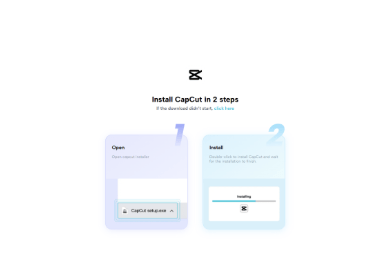
Step 1: Install CapCut Desktop Video Editor
To begin with, get CapCut Desktop Video Editor on its official site. Install the installer and proceed with the onscreen steps to install it on Windows or macOS.
Ensure that your system is up to the minimum specifications to handle AI. It is worth noting that not all advanced features of AI avatars have been free on CapCut PC.
Step 2: Access the AI Avatar
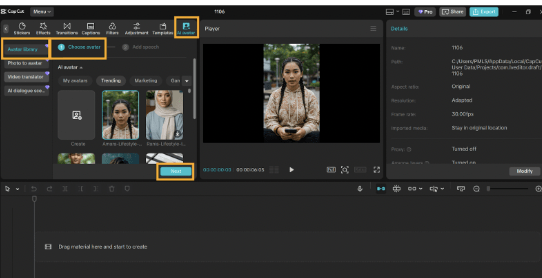
Open CapCut PC and select “AI Avatar” > “avatar library”. You will see over 1,000 characters. Use the ai avatar tool to browse and pick the avatar that you desire for your project.
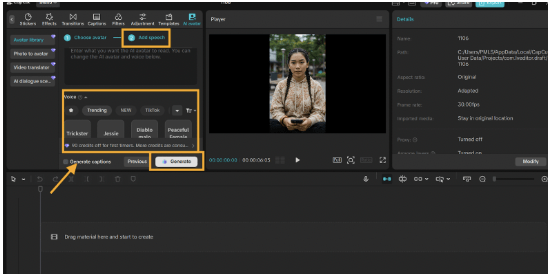
Next, click “Add Speech”. Select one of the AI voices (150 or more). You are able to synchronize your voice to your script tone. After that, click “Generate”. Your avatar is going to begin reading your script.
You might want to preview the video. Ensure that the avatar’s voice, tone and expressions are in line with your content. This action is to make sure that the final video is natural and professional.
Step 3: Edit Your Avatar Video
After creating your avatar, apply filters to make it look better. Change the background to plain colour, image or video which suits your script.
In Under Captions, auto captions is the button that creates subtitles automatically. Review the timing and change the text style or location to read.
If you have a long script, you may cut or divide the avatar video into smaller parts. Ensure that one part corresponds with the other part of your script. Such minor cuts make the video flow progressively and ensure the viewers are entertained.
Step 4: Share Your AI Avatar Video
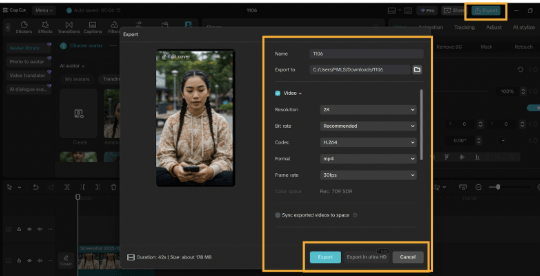
Click Export and save your completed video to your gadget. It is also possible to post it on YouTube, TikTok, or other sites.
CapCut PC allows you to use videos many times without any watermarks. Watch the video before publishing to ensure that the voice and the timing are correct. This last test gives you a well-polished, professional look of your presentation.
Conclusion
CapCut PC allows one to transform a script into an engaging video with the help of AI avatars. You save time, make professional content, and maintain the attention of the viewers.
The avatars are adaptable, and will have customizable voices, backgrounds and styles. There are some sophisticated features which are paid but most of the tools are free.
Become an early adopter of your first AI avatar video. See your script playing on the screen. CapCut Desktop Video Editor makes it easy, quick, and efficient to make entertaining videos.
WE SAID THIS: Don’t Miss…Elevate Your Artistry With Game-Changing AI Portrait Generators